
LiteLLM 1.107.0 was a credential stealer: how it got into the release workflow
A malicious LiteLLM 1.107.0 sat on PyPI for about 1h41m on 21 October 2026 and stole secrets at install time. The timeline, the release-workflow hole, and an audit you can run today.
Prakhar
Backend engineer · PressentifyPublished • Updated 30 October 2026
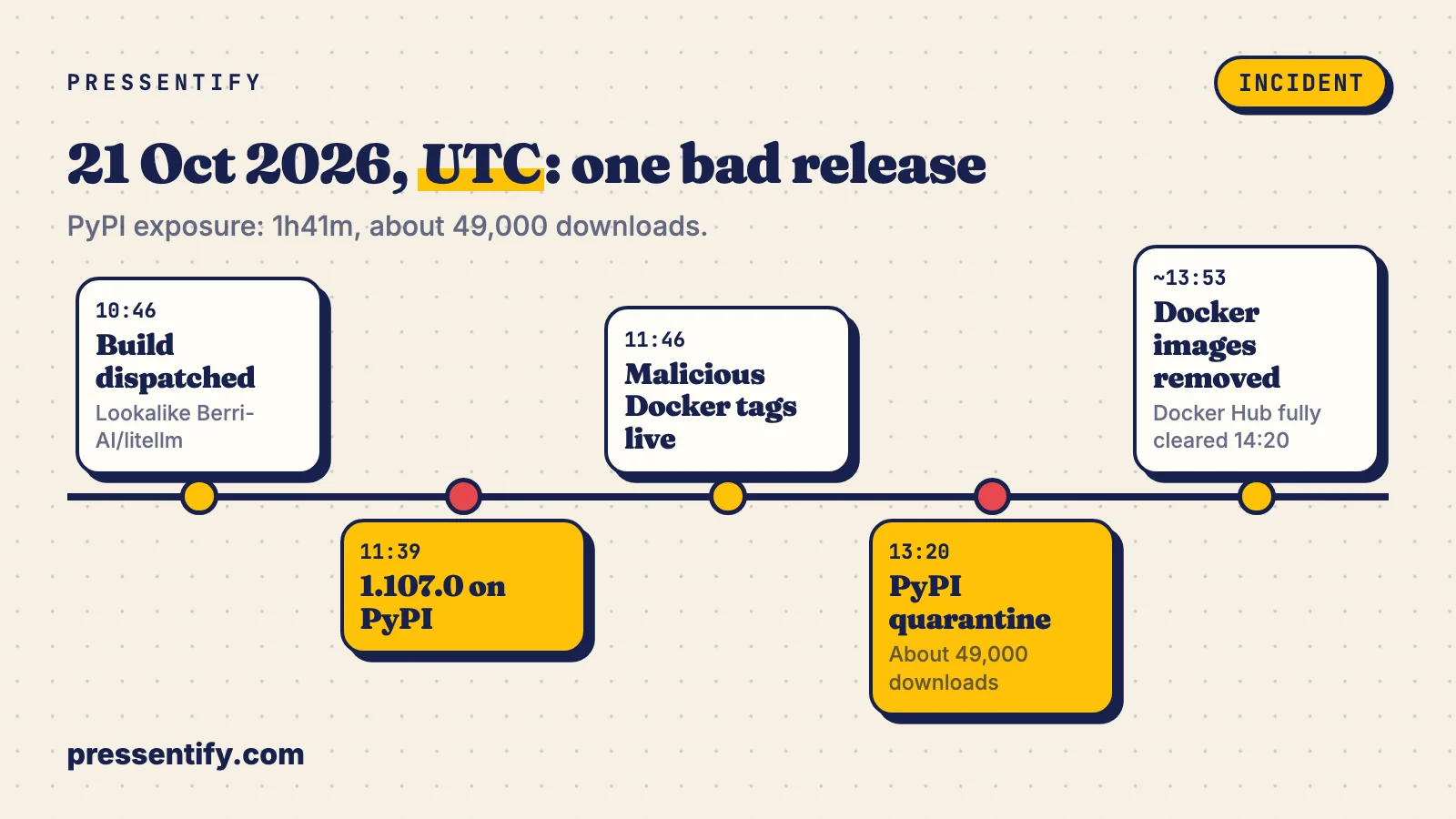
1 hour 41 minutes. That is how long LiteLLM 1.107.0 was on PyPI, from 11:39 UTC on 21 October 2026 until the quarantine at 13:20 UTC. Wiz counts about 49,000 downloads in that window. The Docker tags lasted longer, and a pipeline that pulled latest on its nightly run got the stealer without anyone typing a command.
I care about this one more than the usual bad-package story, because of what LiteLLM is. It is the gateway. Every provider key your team owns sits in or next to it: OpenAI, Anthropic, Cohere, your cloud credentials. Compromise the gateway and you have one stop for all of them.
Installing it was enough, no import needed
The release added three files to site-packages: cook.pth, cook.py and sitecustomize.py. A .pth file can contain an import line, and Python runs it every time the interpreter starts. So a build step, a linter, a REPL, any script in that environment, even one that never touches LiteLLM, executed the stealer. Datadog also lists two runtime markers, /tmp/.pc_once_72129118c59f5636c0bb and /tmp/remote_code_loader.lock.
Per Wiz, the stealer (internally called privcollect) goes after browser credentials, AWS, GCP and Azure keys, LLM provider keys, SSH and GPG keys and shell history. It also queries the LiteLLM database table that stores provider credentials, LiteLLM_CredentialsTable. Output is encrypted before it leaves the machine.
The window, with the arithmetic
from datetime import datetime
rel = datetime(2026, 10, 21, 11, 39)
pull = datetime(2026, 10, 21, 13, 20)
print(pull - rel)                                   # 1:41:00
print(round(49000 / 101), "downloads/min on average")   # 485
About 485 downloads a minute on average. At that rate your CI cache or a colleague’s laptop is a plausible victim, not some abstract population. If your lock file did not exist or did not pin a hash, “probably not me” is not an answer. The audit below is.
How the release pipeline got hijacked
The package source was clean. What changed was the build. According to LiteLLM’s own 23 October analysis, an admin key for its Agent Platform was committed to a public repository on 27 May 2026 and never revoked. On 10 October the attacker used it to pull the GitHub CLI OAuth token of one of two organisation owners out of an API response, then ran workflows on throwaway branches that posted repository secrets, including GH_TOKEN and RELEASE_PLEASE_TOKEN, to a webhook. Three maintainers’ tokens in total.
On 21 October at 10:08 UTC a commit (9cf97e9) added a source_owner input to the release workflow, so it could build from a repository other than BerriAI/litellm. The owner token overrode branch protection to push it. At 10:46 UTC the workflow was dispatched against a lookalike, Berri-AI/litellm. The artefacts went out through the real pipeline, and per shattered.io they were signed there too. A signature proves who ran the pipeline, not what was in it.
Two accounts of the root cause
Run this before you read further
Read-only, bash. It checks pip metadata, the three payload files, Datadog’s /tmp markers, and lists local LiteLLM images so you can compare creation time against the window. It also checks for PRIVCOLLECT_ACTIVE, an environment variable Wiz lists as an indicator. Only Wiz mentions it, so treat a miss as weak evidence and the file checks as the real test.
#!/usr/bin/env bash
# Looks for LiteLLM 1.107.0 traces on this machine. Read-only.
hit=0

for py in python python3; do
  command -v "$py" >/dev/null || continue
  v=$("$py" -m pip show litellm 2>/dev/null | awk '/^Version:/{print $2}')
  [ "$v" = "1.107.0" ] && { echo "HIT  $py has litellm 1.107.0"; hit=1; }
  sp=$("$py" -c 'import site;print(site.getsitepackages()[0])' 2>/dev/null)
  for f in cook.pth cook.py sitecustomize.py; do
    [ -f "$sp/$f" ] && { echo "HIT  $sp/$f"; hit=1; }
  done
done

ls -a /tmp/.pc_once_* /tmp/remote_code_loader.lock 2>/dev/null && hit=1
[ -n "$PRIVCOLLECT_ACTIVE" ] && { echo "HIT  PRIVCOLLECT_ACTIVE is set"; hit=1; }

if command -v docker >/dev/null; then
  docker images --digests --format '{{.Repository}}:{{.Tag}} {{.ID}} {{.CreatedAt}}' | grep -i litellm | sed 's/^/CHECK /'
fi

[ $hit -eq 0 ] && echo "clean (for the checks above)" || echo "ROTATE: see the order in the post"
exit $hit
Example output from a machine that had it (illustrative, not a real host):
$ bash audit-litellm.sh
HIT  python3 has litellm 1.107.0
HIT  /home/dev/.venv/lib/python3.12/site-packages/cook.pth
HIT  /home/dev/.venv/lib/python3.12/site-packages/sitecustomize.py
CHECK ghcr.io/berriai/litellm:latest 3f1c9a77d2b0 2026-10-21 11:52:04 +0000 UTC
ROTATE: see the order in the post
For images, the tag name tells you nothing: latest, main-latest, main-stable and v1.107.0 were all affected on Docker Hub and GHCR. Compare the image creation time against 11:46 to 14:20 UTC on 21 October, and check internal registry mirrors, which can keep poisoned copies after upstream removes them.
What pinning by hash buys you, and what it does not
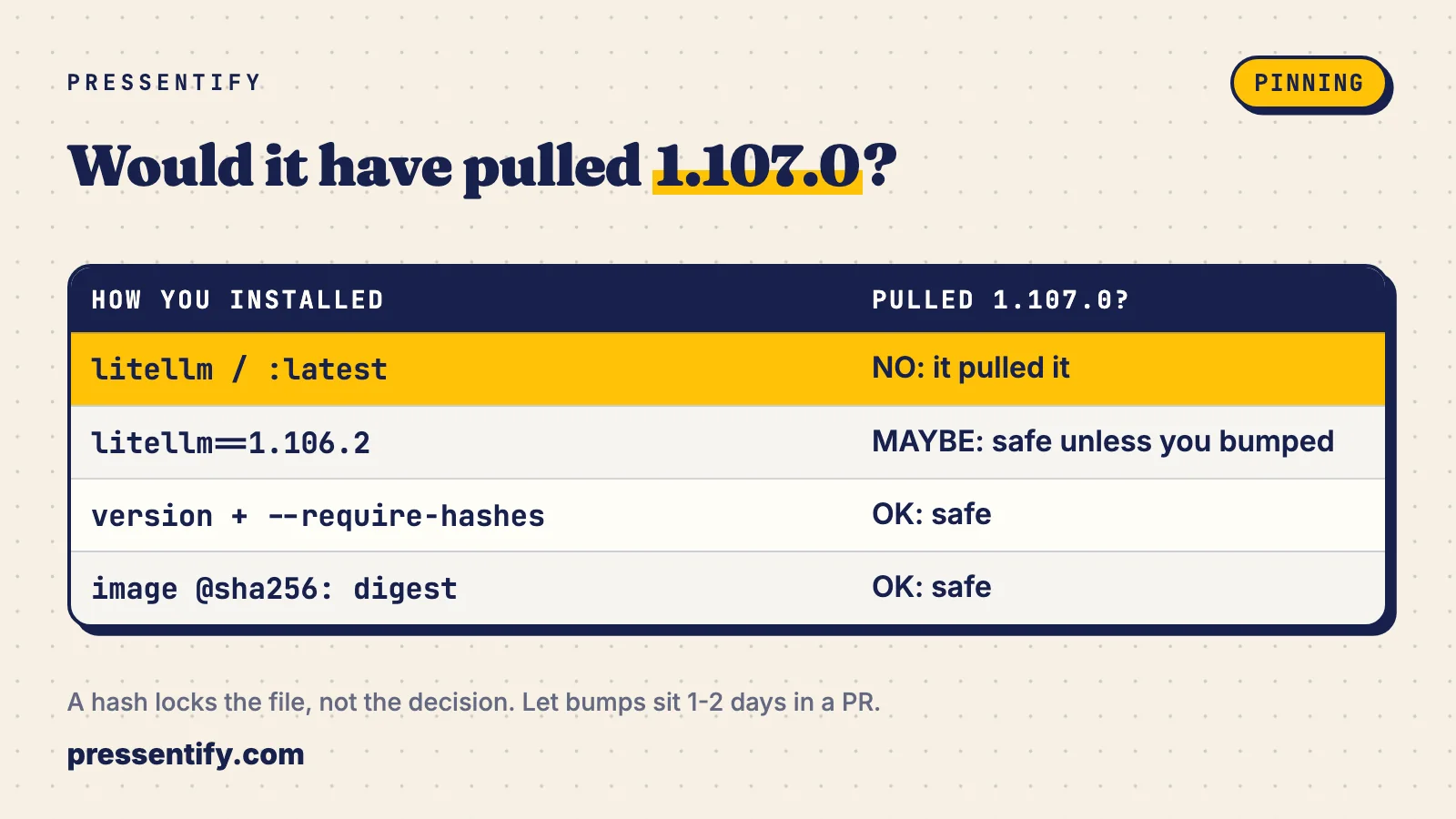
I would pin everything, and I would be honest about the limit. A hash stops latest from moving under you. It does not stop you from approving a bad version on purpose. So the fix has two parts: lock the artefact, and let a version bump sit in a pull request for a day or two before it merges.
# requirements.in
litellm==1.106.2

# generate: pip-compile --generate-hashes requirements.in -o requirements.txt
# requirements.txt (hash below is a placeholder, yours comes from pip-compile)
litellm==1.106.2 \
    --hash=sha256:<64-hex-chars-from-pip-compile>

# install: refuses anything unhashed or mismatched
pip install --require-hashes --no-deps -r requirements.txt
# docker-compose.yml: pin the digest, keep the tag only as a comment
services:
litellm:
# was ghcr.io/berriai/litellm:latest
image: ghcr.io/berriai/litellm@sha256:<digest-you-reviewed>| How you reference it | Pulled 1.107.0 in the window? | Verdict |
|---|---|---|
litellm unpinned or :latest | Yes, on any fresh install or pull | Do not run this anywhere that holds keys |
litellm>=1.100 | Yes | Same as unpinned |
litellm==1.106.2 | No, unless someone bumped it | Fine, weak against a re-uploaded file |
Version plus --require-hashes | No | Good default for Python |
Image by @sha256: digest | No | Good default for containers |
Rotation order if the audit hits
Do this from a clean machine, not the affected host. Order by what can mint more access first, not by which key feels most important.
- Isolate the host or runner. Do not wipe it yet if you want forensics.
- Cloud credentials: AWS, GCP and Azure keys and any role sessions. These create other credentials.
- GitHub tokens, CI secrets, SSH and GPG keys, package registry tokens.
- Every provider key the gateway held. Check the LiteLLM credentials table to see what was there.
- The gateway’s own master key and database password.
- Browser sessions and saved passwords on the machine.
Then go back to 1.106.2, the last good version named by Wiz and Datadog, and fix what made this possible: search your own repos for admin keys and revoke any you find rather than only deleting the commit. A secret in git history is public until it is rotated.
Sources & Credits
- LiteLLM, attack chain analysis, 23 October 2026: docs.litellm.ai
- Wiz, “LiteLLM compromised, steals credentials”: wiz.io
- Datadog Security Labs: securitylabs.datadoghq.com
- shattered.io write-up: shattered.io
- Curated list: webpro255/awesome-ai-agent-attacks
The audit script, timeline maths and decision table are our own and were not run against a live compromised host. Last verified: 2026-10-30. Corrections: if something here is wrong, tell us and we will fix it with a dated note.
Share this article
Written by
Prakhar
Backend engineer · Pressentify
Backend engineer building Pressentify — interactive cheatsheets, handbooks and a job-hunt workspace.
Get the next one in your inbox
One practical backend article at a time. No spam; unsubscribe in one click.
Keep reading
PgBouncer 1.26.1 fixes an auth bypass: one SCRAM password can log in as any user
CVE-2026-107350 lets a client that knows one SCRAM user's password log in as another, admins and superusers included. Two denial-of-service bugs ship in the same release. What to check and what to patch.
· 3 min
Gemini API now stores your requests by default: audit your projects
Since 26 October 2026, new paid Gemini projects store requests for 55 days unless you say otherwise. What changed, what the docs say, and an audit script for call sites that never set store=false.
· 7 min
Copilot drops Opus 4.8 and GPT-5.6 Terra on Nov 16, the API drops Sonnet 4.5 on Nov 30. Are you pinned?
Three retirement dates in the next 31 days, one of them already past for Gemini. A repo scanner for pinned model IDs, an eval gate that blocks regressions, and the order I would migrate in.
· 8 min